Kubernetes Architecture Explained
Introduction
Before I dive into Kubernetes The Hard Way and get my hands dirty by bringing up a new K8S cluster, I thought I’d create a few pages covering Kubernetes theory, architecture, and related concepts.
So, let’s start with the obvious first candidate: Kubernetes architecture.
K8S Architecture Overview
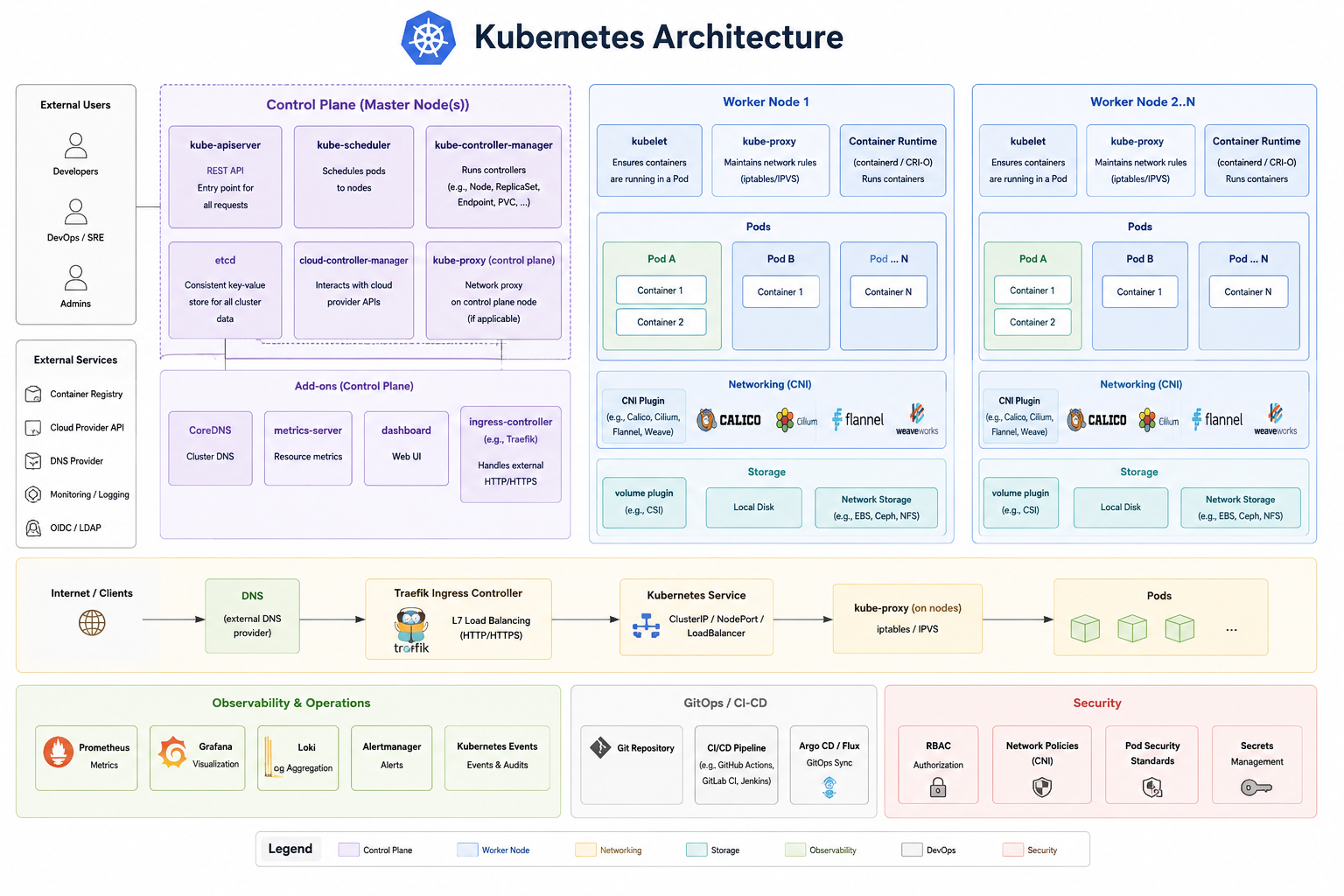
There are two types of Kubernetes nodes. Some nodes run applications, while others control when, how, and where those applications run. The first group of nodes, which runs applications (or containers), is called Worker nodes, while the second group consists of servers called Control Plane (or Master) nodes.
When it comes to the tasks each group performs, the workers’ responsibilities are fairly straightforward: they accept requests to run applications, spin up containers using the specified container runtime, and provide networking and storage. On the other hand, Control Plane nodes perform more complex tasks to ensure the requested state is achieved. Control Plane nodes need to:
- place containers on the appropriate worker nodes
- determine how to place those containers
- identify the most suitable worker node
- store information about each worker node and monitor its state and availability
- and more…
Let’s now look at the individual services that run on each group of hosts.
Components that run on Worker nodes
Worker nodes are responsible for running kubelet and the container runtime, as well as providing networking (CNI) and storage.
Kubelet is a service that runs on each worker node and manages all activities on that node:
- informs Control Plane nodes that a new worker node is ready to join the group
- listens for requests coming from Control Plane nodes, such as information of containers that will be placed on that node
- reports back to Control Plane nodes the status of each container (deployed, running, failed to run, destroyed, etc)
Of course, something needs to deploy containers. That responsibility belongs to the container runtime, such as containerd, rkt, or Docker.
Kube-proxy is another service that runs on Worker nodes. It ensures that containers can communicate with each other—for example, allowing a web server to send requests to a database server running in another container. Kube-proxy accomplishes this by maintaining networking rules using iptables.
Next, there are CNI plugins that provide… well… networking. More specifically, CNI plugins implement the Kubernetes networking model. There are many CNI plugins available, including Calico, Cilium, Flannel, and Weave.
An important note about networking: if a CNI plugin implements packet forwarding for Services itself and provides functionality equivalent to kube-proxy, then kube-proxy does not need to run on the nodes. In that case, kube-proxy becomes optional rather than required.
Lastly, worker nodes are also responsible for providing storage for running pods. Kubernetes supports a number of volume types:
- populating a configuration file based on a ConfigMap or a Secret
- providing some temporary scratch space for a Pod
- sharing a filesystem between two different containers in the same Pod
- sharing a filesystem between two different Pods (even if those Pods run on different nodes)
- durably storing data so that it stays available even if the Pod restarts or is replaced
- passing configuration information to an app running in a container, based on details of the Pod the container is - in (for example: telling a sidecar container what namespace the Pod is running in)
- providing read-only access to data in a different container image
Components that run on Control Plane nodes
There are four main services that run on Control Plane nodes.
The kube-apiserver is the primary management component and is responsible for orchestrating all operations within the cluster. It communicates with all other components on the Control Plane and also sends instructions to Worker nodes.
Next, there is the etcd cluster. etcd stores all cluster information in a key-value (KV) store.
Then, there is kube-scheduler, which is responsible for scheduling Pods. It watches for newly created Pods that have not yet been assigned to a worker node and determines the most suitable node for each Pod. Factors it considers include resource requirements, policy constraints, affinity rules, and more.
Lastly, kube-controller-manager runs different controller processes. Some examples of them are:
- Node controller: Responsible for noticing and responding when nodes go down.
- Job controller: Watches for Job objects that represent one-off tasks, then creates Pods to run those tasks to completion.
- EndpointSlice controller: Populates EndpointSlice objects (to provide a link between Services and Pods).
- ServiceAccount controller: Create default ServiceAccounts for new namespaces.
The following image was taken from the official Kubernetes architecture page:

I have also asked an AI image generator to visualise all components: